Wednesday, August 24, 2016

Ed Tech Newsletter 8/24/2016 : New Process for Technology Reporting, Network Upgrade News, Infinite Campus Parent Portal

New Process for Technology Reporting

Ed, Don and I have been talking over the past few months on piloting a new method for technology reporting. A new page has been created called "Technology Reporting". This page links to building specific forms for reporting technology problems. It also has a section for instructional support. 

To get to the new section:

1) Go to westg.org and go to the staff section.
2) Click on "Technology Reporting" (The link is also below. Feel free to bookmark it)


The first section is for hardware and software issues. When you fill out a report, it sends and email to Ed, Don and myself. It also sends an email to the AV/Tech supplemental holder, if your building has one. This is a replacement for the old trouble reporting system.


The second section is new. It is for instructional support. This sends an email to your building instructional tech supplemental holder (If applicable) and me. This section is for help with incorporating technology into a specific lesson.


You don't need a separate log in for these forms. They are Google Forms. The point is for this to be convenient and easy. Please start to use these instead of emails. It serves the same purpose but also gives us a spreadsheet record of your request. This prevents your needs from getting lost during particularly hectic weeks. 

Network Upgrade News

I wanted to give you a quick update on our network upgrade. As you know, our wired network is aging with most equipment averaging 10 years and beyond. Also, our wireless needs have outgrown our current setup. Last school year, I applied for federal E-rate. Due to this and matching district permanent improvement funds, we have been able to move forward on ordering equipment for an over $230,000 network upgrade. 

This will completely replace the equipment running our wired network. It will also allow us to install wireless devices in every other classroom. This will more than double our current wireless coverage and help resolve the many "holes" in our current wireless connectivity. 

Beyond that, there are also a number of improvements that will allow us to better control and prioritize internet traffic during high traffic times. We can also eventually roll out student and teacher specific network log ins that will allow for greater control over which devices have the strongest access to our bandwidth. 

All of the equipment has just been ordered. Over the next few weeks, I will be giving you more specific details on what this upgrade timeline looks like.

Infinite Campus Parent Portal

If you were with us when we implemented Progress Book, you will remember that there was an initial transition period where our district worked with LGCA to fix any problems behind the scenes. Currently, we are in a similar place with Infinite Campus. 

Our data went live at the end of July and families need to be connected in "households" which is new for our district. A number of staff members have been helping out to connect students, siblings and parents into these groups. This is necessary for us to roll out the parent portal to allow parents access to student grade books and ultimately report cards.

Tomorrow, we will be posting a message letting parents know that the parent portal is coming. We will be releasing follow up information on the timeline for this and what to expect with regards to building communication. 

I know any transition to a new platform can be stressful. Thank you so much for your professionalism and teamwork at the initial trainings. Please feel free to put in an instructional support ticket if you are having any issues with Infinite Campus.

Friday, May 27, 2016

Ed Tech Newsletter 5/27/2016 : Digital Tools for Quizzes and Feedback, Google Classroom, Tips to Prepare for Summer!

Digital Tools for Quizzes and Feedback

The need for feedback on student understanding of instruction has always been an essential part of what improves educational practice. We are in an interesting era in that new and varied free tools are arriving that allow for a wide variety of ease to gathering this information. I found a great article that links to 35 different digital tools that can help with this process. As with anything that I send out, please feel free to reach out if I can help in any way with the implementation of any of these resources.


60 Smarter Ways to Use Google Classroom

I mention Google Classroom quite often. If you don't currently manage student content delivery through your website or Moodle, this a a free and ease to use tool. The attached article has some great ideas for using Google Classroom to make your life easier and to maximize your time. I try to share content that I find that is good for not only new users but more experienced staff. If you are already using Google Classroom, please share your experiences with other staff members. Especially if you have unique ideas that are not listed here.


Prepare Classroom Equipment for the Summer

As we are winding down the school year, I am sure many of you are starting to plan to organize your classroom for summer. Technology benefits the most from putting various cables and accessories away in a careful and organized fashion. Many students are able to help with this process and like the leadership role so consider using them as a resource to help with some of these:

Helpful Tips to Consider:

1) Roll up cables that dangle off the sides of tables or on the floor:

 In many cases these tables are moved around the room or into hallways as a part of the cleanup process. By rolling up the cables, you can help save any unnecessary wear and tear on the cables while keeping them from getting tangled. This saves a huge amount of time in August when it is time to set everything up again.

2) Put loose equipment away in cabinets and drawers:

Remotes, pens from smartboards, mice, and smaller equipment such as document cameras and keyboards often benefit from being put away in cabinets or drawers. It keeps the equipment from being lost but also prevents dust build up during the summer classroom cleaning.

3) Back up your files:

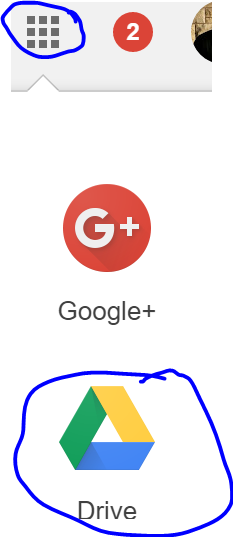
Google Drive has free unlimited storage. If you don't regularly back up your files, to Google Drive, you want to start. You can access the files from any computer when you log into your Google Account. While we do have district servers, the space is limited and you can't access those files from home.

To back up to drive:

1) Click on the navigation tool and choose drive:


2) Choose "new"


3) Choose "file upload" for a single file or "folder upload" for a whole folder.

Note: Uploading a folder can take some time depending on the amount of content. I highly recommend starting that early in the day when you can walk away and do something else.

Friday, May 20, 2016

Ed Tech Newsletter 5/20/2016 : Google Slides Q and A, Embed Charts from Sheets in Slides and Docs for easy editing, Rigor and Relevance Framework

Embed Charts into Slides and Docs

Eric Curts always shares useful tips. This week, he posted an article revolving around how to add a chart to Google Slides or Google Docs that can be easily modified. This is very useful if you are creating something for your students with information that needs to be changed regularly.

Google Slides Q and A

Google rolled out a free update to Google Slides. It's called Q and A. This is really nice if you want student feedback during a presentation. 

To activate it:
1) Click the arrow to the right of present to enter "presenter view"


2) You will see the audience tools section. Click "start new" to allow the audience to submit questions or comments.


3) Students will go to the website URL displayed at the top of the presentation.


4) As questions or comments are submitted, you can see them in the pop up window.


5) The article below addresses this further, along with the new laser pointer option. Please let me know if you need help trying any of this.


Rigor and Relevance Framework to Effectively Integrate Google Apps

At PD Day, we held a session on the SAMR Model. These frameworks to guide thinking with integrating technology are helpful because they can often guide a lesson idea towards the upper levels of Bloom's Taxonomy. It also sets up a process for gradually building to that so students are ready for it. 


Friday, May 6, 2016

Ed Tech Newsletter: Happy Teacher Appreciation Week! Google Classroom Schedule Assignments Update, Flipboard and 10 Terrific Tools for Teachers

Happy Teacher Appreciation Week!


I am noticing more hits on these newsletters each week. Thank you for taking the time to check these out. These newsletters are put together for the purpose of sharing free and easy to implement tools that will help facilitate your instructional goals. Please feel free to reach out if I can help you with any of these. Your efforts to take advantage of new tools to educate our students are appreciated. I hope you had a wonderful teacher appreciation week!

Great news ! Google Classroom Schedule Assignments and More


Many of you are already using Google's free Classroom tool to organize and distribute lesson content to your students. It's also a great way to create interactive assignments and quizzes through Docs and Forms. Over the past week, Google has rolled out a new scheduling feature. Assignments, quizzes, and classroom announcements can be created behind the scenes and be set to "go live" with students when you decide. You can also use it to create assignment drafts behind the scenes. This is much needed functionality and adds convenience. 

This fall will lead to some very specific features towards communicating with parents and guardians. Google continues to improve their free tools based on teacher feedback. Do not hesitate to send them a wish list a features through the feedback tool. You are the target audience so you can help drive the direction of Google Classroom.


Flipboard and 10 Terrific Tools for Teachers


If you haven't used Flipboard, it's a wonderful tool. It organizes news on the web into organized categories that are updated daily. There are many categories dedicated to education that can be personalized to your specific interests. 

One of the articles that caught my eye this week was by Eric Curts. I have mentioned him before and am a big fan of his website. This week, he wrote an article sharing 10 Terrific Chrome Extensions and Google Drive Add Ons that make a teacher's job easier. Many of them are new and are well worth checking out. 

Monday, May 2, 2016

Ed Tech Newsletter May 2, 2016: CaptureCast: Screencasting on Chromebooks, Twitter in Education Article, Second Grade Projects

CaptureCast: Screencasting on Chromebooks

Screencasting is a great opportunity to create content for student learning. It's also a terrific way for students to use a classroom device to explain their learning. This is often associated with iPads apps such as Explain Everything or the PC/Mac tool Screencast-o-matic. Chromebooks can also benefit by adding the extension CaptureCast. The article below describes how to use it. If you need any help, please reach out.


Twitter in Education

Eric Curts shared an interesting article on Twitter in Education this week that I thought was of benefit. 


Even if you don't want to post on Twitter yourself, it is easy to create an account and just search for people and hashtags of interest.

If you aren't familiar with hashtags, when people post conversations involving a linked topic, the put a hashtag in the post so that people can search for the hashtag and get access to only those posts.

EX: Check out our take on a Summer Reading Initiative at

Because the #read4fun is in that post, it will pop up in the list whenever you search for #read4fun in the search bar of Twitter. 

I am also including a list if education hashtags to help you make the most of finding and connecting with the right educators and content that will be potential resources for your needs. 


Second Grade Projects

The second grade team was kind enough to invite me to check out their projects. These multimedia presentations involved a combination of posters, written reports, and visual presentations on classroom devices. Students were given the parameters of what was expected and allows to use tools such as Google Slides, Google Docs, Educreations and more to meet the technology portion of their standards. The parent turnout was amazing. The teachers and students really put together something enjoyable. 

If you are using technology tools in your classroom and would like me to see them or if you need help implementing them, please let me know. 


Tuesday, April 19, 2016

Ed Tech Newsletter April 19, 2016 : Neotie Magazine, Free Edcamp Cleveland, Storybird

STORYBIRD

I always like to highlight unique common core aligned tools. If you haven't heard of Storybird. It is a unique and free website where you can access a wide variety of books for students K-12. Teacher and student accounts are free. Students and teachers can also create books through this site. As with anything that I send out, I am always happy to sit down with you if you want to try out the tool and are having trouble.


NEOTIE MAGAZINE

The new issue of Neotie Magazine is out. There are a wide variety of articles that meet a diverse group of education professionals. On the teaching side, there are some great articles revolving around 15 Awesome Websites, the SAMR Model, APP/Resource Evaluation rubrics, Design Thinking and more.There are also lists of who to follow on Twitter for additional educational resources. If you are interested in contributing a future article, please let me know. 


FREE EDCAMP CLEVELAND 2016

Last weekend, Jileen Urbanek and I attended Mentor's first Edcamp. It was a terrific event. If you haven't been to an Edcamp, it is different from a traditional conference in that the attendees suggest the topics for each session on the day of the event. This leads to facilitated breakout sessions. Having a say in the direction of the conference really makes it a valuable event with discussion and resources shared revolve directly around need. 

Strongsville is hosting one of these free events Saturday, May 21, 2016. It is a great way to get professional development units or you can choose to pay for graduate credit. Further information is below.


Thursday, April 14, 2016

Newsletter 4/14/2016 Free EdCamp Neo Reminder, Edpuzzle, Google Classroom Polling, Open Ed Resources

Ed Camp NEO Reminder

http://www.edcampneo.org/

Reminder: On April 16 from 8:00 am to 1:30 pm, Mentor will be hosting a free Ed Camp. If you haven't had a chance to attend one of these, it's a great opportunity to learn how to use instructional tools for your classroom. There are many teaching ideas to be found and the chance to collaborate with others who have similar classroom goals. I am planning to attend. I hope to see you there.

Note: Click on the "What is Edcamp?" link to get an overview on how this is different from a traditional conference.

EDpuzzle


It's always great to find an amazing video that delivers content to your students. It is so much better when a teacher can check for understanding. Ed Puzzle is a great tool because it allows you to take a video from the internet, such as YouTube, and make it fully interactive. You can add in your own questions, comments or discussion points throughout. You can also get feedback on student progress and understanding. It takes a passive experience and makes it interactive and it is FREE!

Google Classroom Adds Polling Feature


Google's free Classroom tool is continuing to improve. They just released a brand new polling feature. You can use this to create exit tickets, gather feedback, to help students self monitor and more. The article above goes into more specifics but the tool expands upon the great features already available.

Free Interactive Open Ed Resources


Finding resource that matches the needs of the Common Core is often a stressful concern. Stephanie DeMichele joined us during PD Day for the App Smashing session. She's written an informative and easy to use ebook on how to organize and use Open Ed Resources to benefit classroom instruction when traditional textbooks are not enough or are missing large amounts of required content.

It is filled with links to free resources that you can click on right from inside the book. It is worth checking out!

Trouble Reporting and Appointment Scheduling

As is the case with any of the tools and resources that I share, this is a starting point. Please reach out if I can help in any way, when you try to implement any of these resources. If you are trying a lesson, I would be happy to stop by and check it out or help in some way. 

One of our goals in 2016 is to continue to improve the error reporting process so we get to your needs faster. This requires a little help from you. Please make sure you report issues early. If something is a reoccurring issue, please let us know so we can help. Don't let it get to the point of frustration. 

For High School: Please email HSTrouble.Reports@westg.org

For Elementary and Middle School: Please contact your AV/Tech Supplemental Holder. They will put is a Trouble Ticket that will make us aware of the issue. This is important because it allows us to organize and keep track of progress.

Information that we need from you:

Date: 
Time:
Room Number:
What is the problem you are having:
Were there any error messages? 
What were they?
Does this happen all the time or in specific situations?

The more you tell us, the faster we will pin down the actual problem and be able to resolve you issue. 

HOW TO SCHEDULE A TIME TO MEET?

The easiest way to contact me is through email at sean.whelan@westg.org. Please let me know what you'd like to meet about, your room number, free periods, and any other info that might be helpful to me in order to prepare for our meeting. I'd love to meet with you to see if I can help facilitate any issue you might be having. Also, if there is something I share that you would like to implement in your classroom or with your team, please let me know. I would be thrilled to help.